
Every month brings another list of AI tools for companies, and most of them repeat prices that were true a year ago or describe features that are not in the plan you would actually buy. This guide was built the other way round. Every price and every usage limit in it was read in October 2026 from the tool's own pricing page, or from independent reviews that had checked that page within the previous two months, and every tool was weighed against one question: what does it solve for a company working in the Gulf?
Three notes before the numbers, because they apply to everything below.
- Prices are in US dollars and before tax. Most companies show two: the monthly price if you pay for a year up front, and the higher price if you pay month to month. The saving is usually between a sixth and a third. Both figures are given here.
- Both of the general assistants start at two seats, so the real entry price is twice the one on the page.
- Prices move. OpenAI cut the price of its business plan in April 2026, and Google renamed NotebookLM to Gemini Notebook. What you read here is correct on 14 October 2026, and every official page is linked at the end so you can check before you pay.
Three questions before you pay for anything
A tool cannot solve a problem you have not named. Before any subscription, answer three questions on paper.
- Where do the hours go? Ask every person on the team: which repeated task takes the most of your week? If the answer is "replying to the same customer questions", your tool is a completely different one from the company whose answer is "writing proposals and contracts".
- Who will actually use it? A five seat tool used by one person is four wasted subscriptions. Start at the minimum number of seats and add more when you need them, because every tool in this guide lets you add seats at any time.
- What data will you put into it? Your prices, your contracts and your customer records go onto servers outside your country. The team plans on ChatGPT and Claude both state that your content is not used to train the models; a free personal account does not guarantee that by default. That alone is reason enough to buy the team plan even when the team is two people.
A simple rule: one general tool for the whole team, one specialist tool for your biggest problem, and one tool to connect them. More than that in the first months means nobody masters anything.
The five paid tools, at October 2026 prices
| Tool | What it solves | The verified price | What to know before you buy |
|---|---|---|---|
| ChatGPT Business | A general assistant for the team: writing proposals and messages, reading files and spreadsheets, and building custom assistants for the jobs your company repeats (these were called GPTs and now appear as plugins) | $20 per seat per month billed annually, or $25 per seat month to month | Two seats minimum. Payment by card, with invoicing available on Enterprise only. No training on your business data by default. Includes SAML single sign-on, usage analytics and spend controls. The price came down $5 in April 2026 |
| Claude Team | Long documents (contracts, financial reports, tenders), careful writing, working directly on your files, and Claude Code for development work | $20 per seat per month billed annually, or $25 month to month. A premium seat with five times the usage is $100 or $125 | Two to 150 seats. Single sign-on and central billing. Card only, no invoicing, and seats can be added mid-term. No training on your content by default |
| HubSpot (Starter Customer Platform with Breeze) | A CRM with AI agents built in: a prospecting agent, a customer service agent, and the Breeze assistant for meeting preparation and writing messages | $20 per seat per month month-to-month, lower on annual billing and lower again on the introductory offer HubSpot runs for new customers. Includes 500 HubSpot credits a month for the AI features | Sales Hub Professional is about $90 per seat per month on annual billing, with a compulsory one-time onboarding fee of $1,500. The agents consume credits, and extra credits cost about a cent each, so roughly $10 per thousand |
| Zapier Professional | Connecting your apps without code: a new enquiry on the form lands in the CRM and a notification reaches WhatsApp or email on its own | $19.99 a month billed annually, or $29.99 month to month, for 750 tasks. The Team plan is $69 a month billed annually for 2,000 tasks and up to 25 users | Professional is a single user. Every app step counts as a task and Zapier's own built-in tools count as none. An AI step costs one task on a standard model, three on an advanced model and five on a premium one, so the bill rises with how you build, not with how many staff you have |
| Perplexity | Research on markets, competitors and suppliers, with the sources attached to the answer rather than trusting the model's memory | Pro for one person: $17 a month billed annually. Enterprise Pro for teams: $34 per seat per month billed annually | The team plan adds single sign-on, no training on your data, permission management and 500 monthly credits a seat. The official page quotes annual billing only, so check the monthly figure in your own account before you commit |
How do you choose between the first two? If your team's daily work is writing, messaging and reading spreadsheets, the gap between ChatGPT and Claude is smaller than the gap between either of them and having no tool at all. Try both for a week on a real job from your own company, since both offer a free personal plan that is enough to judge by, and keep whichever your team reaches for. The one thing not to give up is buying the team plan rather than the personal one, because of that condition about training.
For companies that care where data lives: ChatGPT Enterprise, the large custom-priced plan, supports data residency in ten regions including the United Arab Emirates. That is not available on Business.
The five free tools: what you really get, and where it stops
"Free" in software means one of three things: free forever within a monthly limit, free until a one-off allowance runs out and never renews, or a trial with an end date. The table says which is which.
| Tool | What it solves | What the free plan includes | Where it stops |
|---|---|---|---|
| Gemini Notebook (Google's new name for NotebookLM) | An internal knowledge base: upload your policies, your product manual and your standard contracts, ask in Arabic, and get answers drawn only from your own files with the source named. Useful for bringing new staff up to speed | Free forever: up to 100 notebooks, 50 sources per notebook, and up to 500,000 words or 200MB per source | There is a usage cap that refreshes every five hours, with a weekly cap above it. Raising sources to 100 or 300 per notebook needs a Google AI Plus or Pro subscription. Your material is not used for training unless you send feedback on an answer |
| HubSpot Free CRM with the Breeze assistant | A record of customers and deals with message tracking, plus an assistant that summarises a customer's history and helps you prepare for the meeting | Free forever for two users, with HubSpot branding on your marketing emails | A third user, removing the branding, or the prospecting and service agents all require the Starter plan |
| Canva Free | Designing social posts, decks and catalogues in Arabic without a designer | Free forever, with thousands of templates, 5GB of storage, and a limited monthly allowance of AI tools | Unlimited background removal, automatic resizing and the brand kit are all in Pro, around $144 a year (about $12 a month) or $18 month to month. Canva prices in your own country's currency and the figure differs by country, so read it on your own page. What used to be called Canva Teams is now Canva Business |
| Otter.ai Basic | Transcribing meetings, summarising them and pulling out the actions | Free forever: 300 transcription minutes a month, a 30 minute ceiling per meeting, three uploaded files for the life of the account, and up to five people in the workspace | An important warning: Otter transcribes six languages (English, Spanish, French, German, Japanese and Chinese) and Arabic is not one of them. It is no use to a company whose meetings are in Arabic. The alternative is the transcription built into your meeting platform: Microsoft lists Arabic (Saudi Arabia) and Arabic (United Arab Emirates) among the languages Teams live transcription supports |
| Zapier Free | Trying automation out: a form on the site sends the enquiry into a sheet or a CRM on its own | Free forever: 100 tasks a month, two-step automations only (one trigger and one action), and one user | Any automation of three steps or more, the premium apps, and the faster checking interval all need Professional |
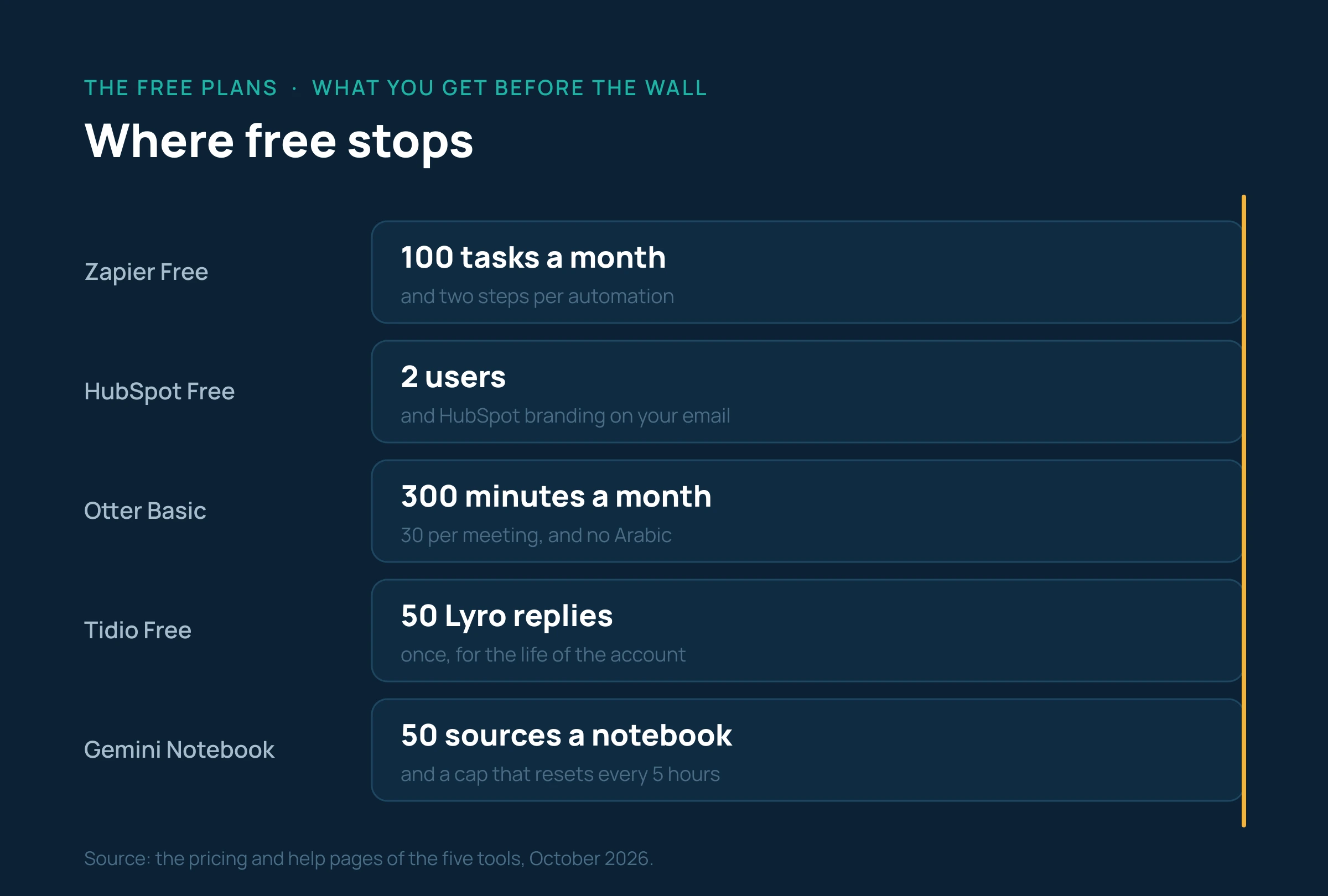
A sixth option for customer service: Tidio has a free forever plan with live chat on your site for 50 conversations a month and up to ten seats, plus 50 conversations from its Lyro AI agent as a one-off allowance that never renews. After that the agent costs from $32.50 a month billed annually, or $39 month to month, per 50 conversations. Which is to say that the free part of Tidio is the human chat, not the automatic reply.
A worked example: what does a team of five pay?
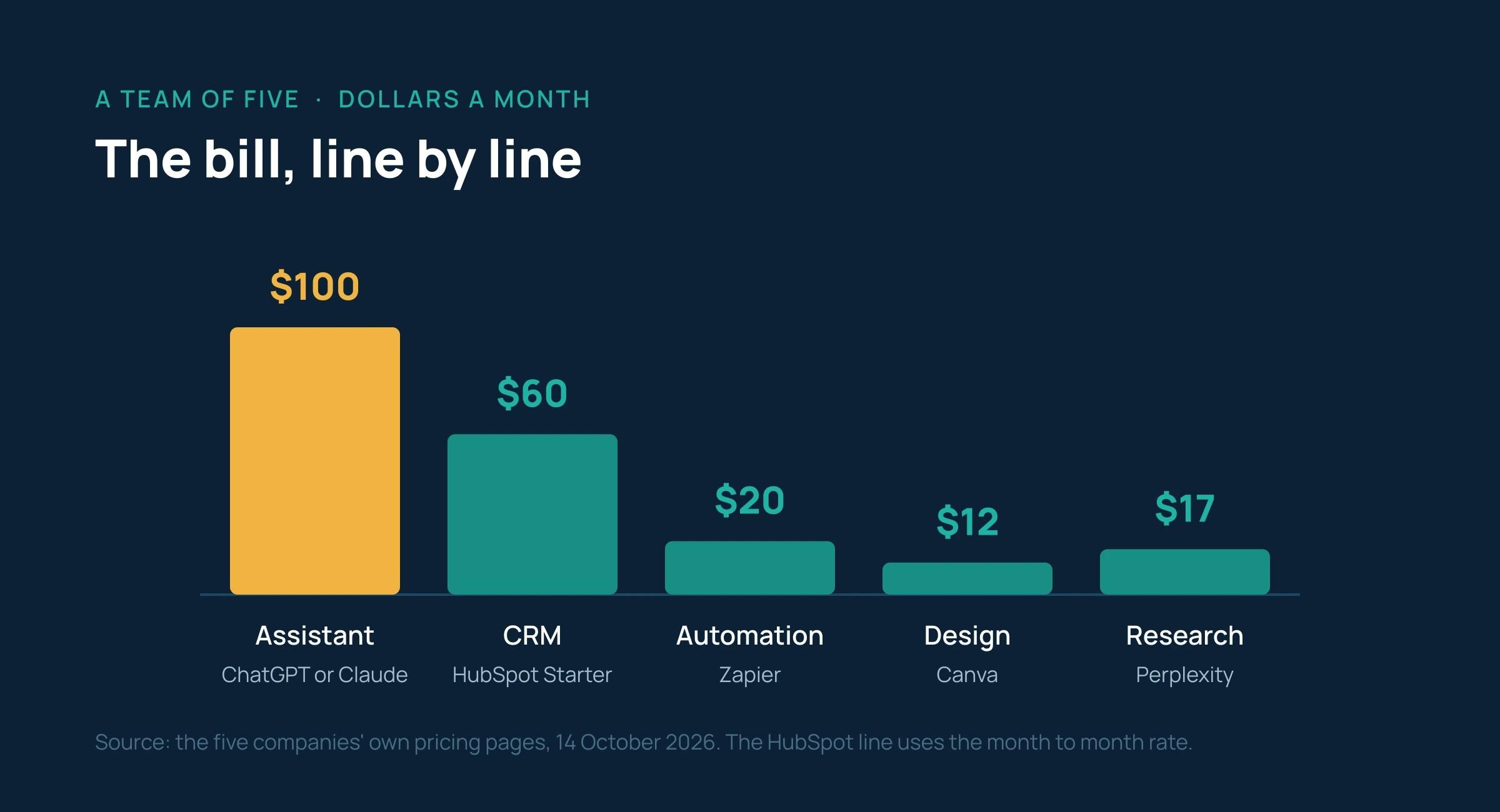
Take a small Gulf company: an owner, a salesperson, a marketer, an accountant and someone on customer service. The figures below use annual subscription prices before tax, taken from the verified numbers above. The HubSpot line is the exception and uses the month to month rate, because its annual and introductory rates vary.
| Item | The choice | The sum | Dollars a month |
|---|---|---|---|
| A general assistant for the team | ChatGPT Business or Claude Team, five standard seats | 5 × 20 | 100 |
| Customer management | HubSpot Starter for three seats (sales, marketing and service), the rest on the free account | 3 × 20 | 60 |
| Automation | Zapier Professional, one account for the owner or whoever is technical | 19.99 | 20 |
| Design | Canva Pro, one licence for whoever does the marketing | 144 ÷ 12 | 12 |
| Research | Perplexity Pro, one licence for the owner or for sales | 17 | 17 |
| Total | About $209 a month |
That is about 784 Saudi riyals or about 770 UAE dirhams a month before tax, for a whole team working with five tools. It is an amount that is easy to justify if it saves each person one hour of work a week, and hard to justify if it is paid for and not used.
And if you want to start at zero: Gemini Notebook for internal knowledge, the free HubSpot for two users, the free Canva, the free Zapier for one two-step automation, and the free Tidio for chat on the site. The cost is nothing and the real price is the limits: two users in the CRM, 100 automation tasks a month, and an AI allowance that runs out in a week. Treat it as a 30 day trial in which you learn which tool is worth paying for.
The line to watch on the invoice is not seats, it is consumption. HubSpot credits, Zapier tasks and Lyro conversations in Tidio are all counted by use, and they rise with your success rather than with your headcount.
Five questions to ask before you pay, from the Gulf
- Does it really work in Arabic? Writing and analysis in Arabic work well in ChatGPT, Claude, Gemini Notebook, Perplexity and Canva. Transcription is a different matter: Otter does not support Arabic at all. Test every tool on a piece of your own real work, not on a general question, before you subscribe.
- Where is your data stored? Most of these tools hold data in the United States or Europe. A company dealing with government bodies or sensitive records needs an Enterprise plan with local data residency, which ChatGPT Enterprise offers for the United Arab Emirates. For everything else, the no-training condition in the team plans is enough.
- How will you pay, and how will you get an invoice? ChatGPT Business, Claude Team and most of the smaller plans are paid by credit card and issue an electronic receipt; a company invoice needs Enterprise. Ask your accountant whether a card receipt is acceptable as an expense document before you subscribe in the company's name.
- What about tax? The advertised prices are before tax. VAT is 15 per cent in Saudi Arabia and 5 per cent in the UAE, and how it is applied to a digital service from a foreign supplier depends on your own tax position. That is a question for your accountant, not for an article.
- What is the real minimum? Two seats on ChatGPT Business and Claude Team, a single user on Zapier Professional, and two users on the free HubSpot. And remember that the cheaper annual subscription means paying for a full year up front, which is a cash decision rather than a software one.
The official sources
Every figure in this guide was checked on 14 October 2026. Official pages first, then the independent reviews that reported them and the date they were checked.
- OpenAI, the official pricing page (two seat minimum, payment, data residency): chatgpt.com/pricing
- Anthropic, the official pricing page for Claude plans: claude.com/pricing
- ChatGPT Business pricing after the April 2026 cut: Coworker
- Claude Team pricing, checked 25 September 2026: Nesyona
- HubSpot, the Sales Hub pricing page: hubspot.com/pricing/sales
- An independent review of HubSpot pricing, checked 4 October 2026: Prompthackers
- Zapier, the official pricing page and the task rate card: zapier.com/pricing and zapier.com/pricing/rates
- An independent review of Zapier pricing, 30 September 2026: Superdupr
- Perplexity, the official pricing page for individuals and enterprise: perplexity.ai/hub/pricing
- Gemini Notebook plans and limits, Google's own help pages: plans, usage limits and source limits
- The date NotebookLM was renamed: Elephas
- Canva, the official pricing page: canva.com/pricing, and the US figures for September 2026: Fello AI
- Otter.ai, the official pricing page, including the list of transcription languages: otter.ai/pricing
- Otter.ai's lack of Arabic support: VexaScribe
- Transcription languages in Microsoft Teams: the University of Texas at Dallas user guide
- Tidio, the official pricing page: tidio.com/pricing, and an independent review checked on 2 October 2026: Toollers